
Start your OnlyFans tip menu with an anchor item in the lower single-digit to low double-digit dollar range, then space the rest at roughly 2x, 5x, and 10x that number. topping out with a ceiling offer in higher double digits. That's the skeleton. The sections below cover full menus, wording templates, and the pricing logic behind each rung.
TL;DR:
- Using an anchor item priced between $5 and $15 provides a low-cost impulse purchase that encourages fans to explore higher-priced content.
- Spacing your menu items with clear multiples such as 2x, 5x, and 10x the anchor price creates a natural upsell path and reduces buyers' hesitation.
- Testing menu prices every three to six months and grandfathering existing subscribers during updates maximizes revenue without sacrificing loyalty.
- Keeping the menu concise with about eight to ten grouped items prevents overwhelming fans and boosts purchase likelihood.
- Prioritizing the placement of the tip menu in pinned posts, bios, and welcome messages ensures maximum visibility and conversion.
Table of Contents
- What Is OnlyFans Menu Pricing, and Where Does the Menu Go?
- What to Put on Your OnlyFans Tip Menu
- How Much Should You Charge? Price Bands and Three Example Menus
- Building the Ladder: Anchors, Spacing, and When to Raise Prices
- How to Format and Post a Menu That Actually Converts
- The Pricing Mistakes That Quietly Cost You Money
- An Operator's Checklist for a 30-Day Pricing Audit
- Why Most Pricing Advice Gets This Backward
- A Different Path: Letting a Team Run Your Pricing and Chats
- Where This Pricing Guidance Comes From
- Sources
- FAQ
What Is OnlyFans Menu Pricing, and Where Does the Menu Go?
A tip menu is a priced list of content and interactions you sell beyond your base subscription. It does three jobs at once: it signals what you actually offer, it converts scrollers into buyers by removing the "how much is this" friction, and it sets boundaries so fans know what's on the table and what isn't.
Getting the mechanics right matters as much as the copy, because OnlyFans menu pricing operates inside fixed platform limits. According to OnlyFans' Terms, subscriptions must fall between $4.99 and $49.99, and the platform keeps 20% of every Fan Payment before payout, with earnings settled in USD. Every price on your menu should be built with that cut already factored in, not treated as a surprise at withdrawal time.
Where you post the menu shapes how many people see it before they scroll past:
- Pinned post: The first thing a new subscriber sees on your profile, so it's the highest-traffic placement you have.
- Bio: A short line or link here catches browsers before they even subscribe.
- Welcome message: Sent automatically to new subs while their intent to spend is highest.
Posting it in only one of these spots leaves money on the table.
What to Put on Your OnlyFans Tip Menu
Item selection is really a time budget decision. Cheap, fast items pull volume; expensive, slow items pull margin. A workable OnlyFans menu mixes both instead of leaning on just one end.
Entry items cost you almost nothing to produce and exist to get someone spending for the first time:
- Ratings or rankings (fan sends a photo, you respond with feedback)
- Single existing photos pulled from your library
- Short personalized text or a shoutout
Bread-and-butter items are where most of your monthly revenue actually lives:
- Custom photos, generally a 10 to 20 minute turnaround per set
- Short custom videos, roughly 15 to 45 minutes depending on complexity
- Voice notes or dirty talk audio, quick to record but priced for the intimacy factor
- Sexting sessions, priced by time block rather than a flat rate
Premium items take the most time or the most personal exposure, so they should carry your highest per-minute value:
- Video calls, priced per 10 or 15 minute increment
- Bundles combining several categories at a discount to the sum of parts
- Custom fetish or niche content that requires props, outfits, or extended setup
If your content is SFW or you run a lifestyle page, the same ladder logic still applies. Swap "custom video" for a personalized workout plan, a voice memo of advice, or a Q&A call. Pro Tip: Price your slowest item highest, always. If a video call eats 20 minutes of your evening, it should out earn ten quick photo sends combined, or you're better off skipping it.
How Much Should You Charge? Price Bands and Three Example Menus
Market data gives you a floor to build from. The median paid subscription across roughly 9,500 tracked pages is $7.99, with the middle half priced between about $4.80 and $11.11, and only around 1 in 10 paid pages charge more than $16 a month.
By the numbers: Median subscription $7.99. Roughly 10% of paid pages charge above $16. Nearly a third run free pages and monetize entirely through menu sales.
Per-item pricing tends to cluster in fairly consistent bands regardless of niche, according to aggregated creator pricing data:
- Custom photos: $8 to $25 per image or small set
- Custom videos (short to medium length): $15 to $60
- Voice notes: $5 to $15
- Sexting or video sessions: priced per time block, often $20 to $60 for 15 to 30 minutes
- Tips: commonly $5 to $100 depending on the fan and the ask
Here's how those bands translate into three menus you can copy and adjust.
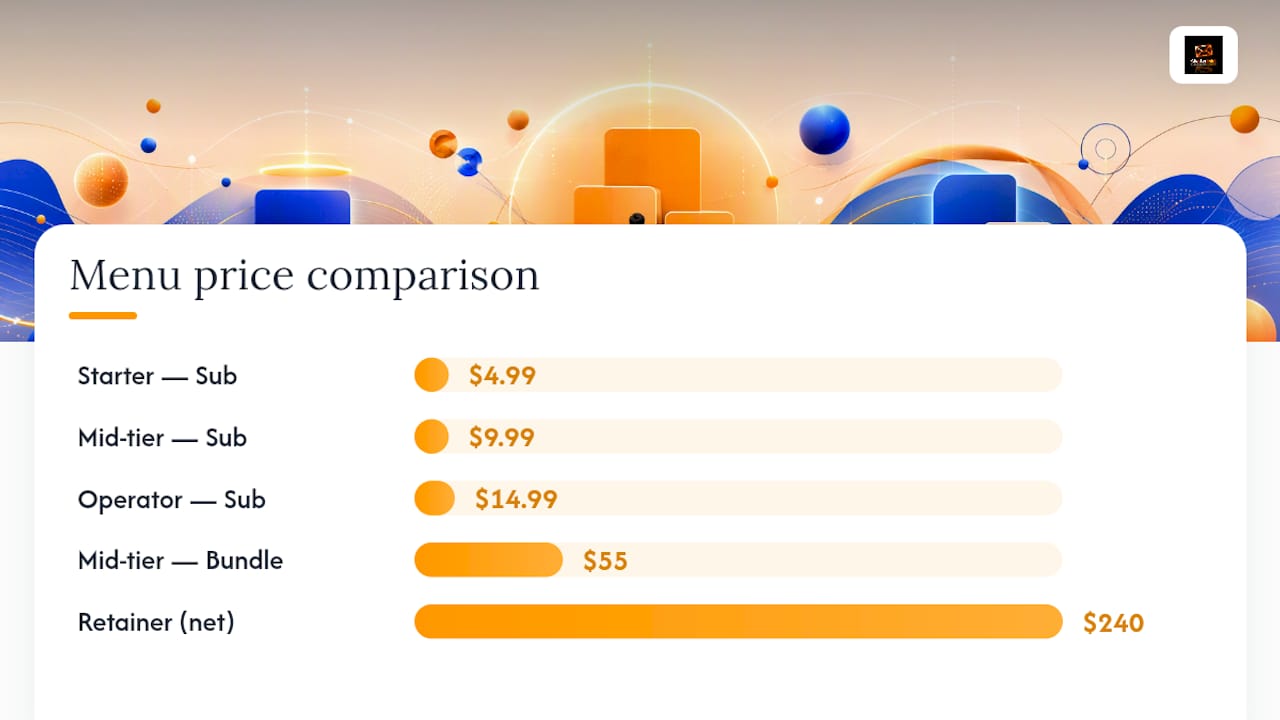
Starter menu (new page, building trust): Subscription $4.99 · Rating $5 · Custom photo $12 · Voice note $8 · Short video $20 · Video call (10 min) $40.
Mid-tier menu (established page, steady buyers): Subscription $9.99 · Custom photo $18 · Short video $35 · Sexting session (20 min) $30 · Voice note $10 · Bundle (photo + video + voice) $55. A bundle-heavy week grossing $600 nets $480 after fees.
Operator menu (whale-tier, high-touch): Subscription $14.99 · Custom video $60 · Video call (15 min) $75 · Full GFE bundle $150 · Custom fetish request $100 · Monthly retainer package $300. One retainer sale alone nets $240 after the platform's cut.
Building the Ladder: Anchors, Spacing, and When to Raise Prices
Your anchor item is the cheapest thing on the menu that still feels worth buying on impulse, and it does more work than any other line. Operator practice puts that anchor between $5 and $15, low enough that a fan buys it without thinking twice, high enough that it isn't a throwaway.
From there, spacing matters more than the raw numbers. A common template runs:
- Anchor: $10
- Step two (2x anchor): $20 to $25
- Step three (5x anchor): $50
- Step four (10x anchor): $100
- Ceiling item: $150 or higher, reserved for full sessions or retainers
Each rung should feel like a clear upgrade, not a confusing near-duplicate of the one below it. Two items priced $22 and $28 next to each other just create hesitation. Two items priced $20 and $50 create a decision.
Repricing works the same way rent increases do: small, telegraphed, and rare. Move prices every three to six months, never weekly. When you do raise a number, grandfather existing subscribers at their locked-in rate for at least one billing cycle and announce the change in a mass message a few days ahead. Fans tolerate a price bump; they don't tolerate a surprise one.
Pro Tip: Run two ladders side by side for 30 days with identical posting times and promotion, then compare which one produced a higher average order value without dropping your baseline conversion rate.
How to Format and Post a Menu That Actually Converts
Formatting is where a lot of solid pricing gets undermined by sloppy presentation. One item per line, one price per line, no paragraph breaks explaining backstory. A fan scanning your pinned post has maybe three seconds before they decide to buy or move on.
Keep these formatting rules non negotiable:
- Round every price to a whole or half dollar. $18.73 looks accidental; $18 or $20 looks intentional.
- Name the deliverable in three to six words: "Custom photo set (5 pics)," not a paragraph.
- Include turnaround time on anything that isn't instant, like "ships in 24 hours."
- Group by category with a short header, not one long undifferentiated list.
Three template styles cover most situations, based on common creator template patterns. A classic list, plain text with emoji bullets, works everywhere and loads fast on mobile. A grid or graphic layout looks polished for pinned posts but takes longer to update, so use it only when your prices are stable. Themed menus, matching a cosplay or seasonal aesthetic, work well for niche pages but need refreshing more often, which adds upkeep.
Post the same menu in three places with slightly different framing: the full version pinned to your profile, a condensed three-item teaser in your bio link, and a "new here? Here's what I offer" version in your automated welcome message.
The Pricing Mistakes That Quietly Cost You Money
Most underperforming menus fail for the same handful of reasons, and all of them are fixable in a weekend.
- Overlong lists. Fifteen items with no visual grouping overwhelms a buyer into doing nothing. Cut to eight or ten, grouped by category.
- No clear anchor. If your cheapest item is $30, you've priced out the impulse buyer who would have upgraded later. Add a real anchor under $15.
- Bad spacing. Items priced $25 and $30 next to each other create hesitation instead of a clear upgrade path. Push wider gaps between tiers.
- Menu prices that ignore your PPV history. If you've been selling custom videos in DMs for $40, don't list them at $60 on the public menu. Match your menu to what actually sells.
Once the menu is fixed, run a simple 30/60/90 day test: leave pricing untouched for 30 days while tracking sales per item, raise your anchor or one mid-tier item at day 30, then compare average tip size and pinned-post conversion at day 60 and day 90. If sales per item drop after a change, revert it. If average order value climbs without a conversion drop, keep it.
An Operator's Checklist for a 30-Day Pricing Audit
Chatterlinkk works inside creator accounts daily, and one pattern holds up across niches: creators rarely have a pricing problem, they have a testing problem. Nobody is running the experiment long enough to know what's actually working.
A basic 30-day audit looks like this:
- Week 1: Audit every item on the current menu against actual sales history, not gut feeling.
- Week 2: Test a new anchor price against the old one with identical promotion.
- Week 3: Bundle three items together and measure uptake against selling them separately.
- Week 4: Repin the updated menu and track the messaging funnel from welcome message to first purchase.
Chatterlinkk's Full-Scale Management service builds this kind of testing into ongoing account management, backed by native-language chat teams and direct founder access rather than a rotating support queue. If you're running this audit solo and finding you don't have the hours to test, message, and analyze results every week, that's usually the signal it's time to bring in help rather than a sign you're doing it wrong.
Why Most Pricing Advice Gets This Backward
Most guides on OnlyFans menu pricing obsess over the exact dollar figure for a custom video, as if there's one correct number waiting to be discovered. The market data doesn't support that. A median subscription near $7.99 with per-item ranges spanning $8 to $60 tells you the range is wide because context, niche, and existing audience trust all move the number more than any formula does.
What actually separates a menu that converts from one that doesn't is spacing and structure, not the specific price on any single line. A ladder with clean 2x, 5x, and 10x jumps outperforms a "correctly priced" menu with muddy gaps between items, because spacing is what makes the upsell obvious to the fan without you saying a word.
The conventional advice to "just charge what you're worth" also misses the operational reality: pricing is a testing exercise, not a one-time decision. Creators who treat their menu as a living document, revisited every quarter with real sales data, consistently outperform creators who set it once and never touch it again. Start with the anchor. Fix the spacing. Then test.
— Chatter
A Different Path: Letting a Team Run Your Pricing and Chats
Testing ladders, rewriting menus, and staying in DMs at 2 AM is a full-time job on top of content creation. There are agencies for creators who'd rather hand operational load to people who do it across dozens of accounts every day. Some full-scale management services pair pricing strategy with 24/7 native-language audience engagement, so your welcome messages, upsells, and repricing tests run continuously instead of whenever you have an hour free.
Some agencies differentiate with founder access instead of a support ticket queue, dedicated specialist teams instead of outsourced generalists, and video learning modules so you understand the strategy behind every price change your team makes, not just the results. Some clients of these agencies have seen individual months cross $100,000 in revenue, built on exactly the kind of anchor testing and ladder spacing covered above, run at a pace no solo creator can sustain alone.
If your menu hasn't changed in six months, that's the clearest sign it's time for a second opinion. Visit the Full-Scale Management page to see what a managed pricing strategy could look like for your account.
Where This Pricing Guidance Comes From
The price bands and platform rules in this guide come from a handful of primary and market sources. OnlyFans' own Terms set the hard limits: subscription caps, the 20% fee, and USD-only payouts. The FanChecked Price Index supplies the market medians drawn from thousands of tracked pages. Operator-level menu architecture, including anchor bands and ladder ratios, draws on practitioner guidance from WaifuTalent's tip menu breakdown, and itemized per-category ranges come from OnlySonar's pricing overview.
Sources
- How Much Should You Charge on OnlyFans? Real Prices From 9,500+ Creators (2026) | FanChecked
- OnlyFans Terms
- OnlyFans pricing overview and itemized ranges | OnlySonar
FAQ
How Much Do OnlyFans Creators Typically Charge?
Median paid subscriptions sit around $7.99, with per-item prices ranging from $5 for voice notes up to $150 or more for full custom bundles and retainers.
What Is a Menu on OnlyFans?
It's a priced list of content and interactions, like custom photos, videos, calls, and bundles, that you post as a pinned item, in your bio, or in your welcome message so fans know exactly what's available to buy.
How Can I Make $100 a Day on OnlyFans?
Consistent daily income usually comes from a mix of subscription renewals, a few mid-tier menu sales ($20 to $50 items), and at least one higher-ticket bundle or video call rather than relying on subscription price alone. Creators who track this closely, whether solo or through a managed service like Chatterlinkk, find bundling and upselling existing subscribers gets there faster than raising the subscription price.
What Should I Price My OnlyFans Subscription At?
Start in the $4.99 to $9.99 range to stay competitive with the market median, then generate most of your revenue through your tip menu, PPV content, and bundles rather than a high subscription price alone.